7 min read
Lightpro transformer: 24, 100 or 150 W, and the cable
Lightpro makes three transformers, 24 W, Touch 100 W and Touch 150 W, and one 14 AWG cable up to 80 m. How to pick the size and connect lights and branches.
A Lightpro transformer turns 230 volts into 12 volts for your garden lights, and it comes in three sizes: 24 W, the Touch 100 W and the Touch 150 W. Add up the watts of all your lights and accessories and take the size above that. At full load, one main cable may run 80 metres from the transformer.
Lightpro is the brand a landscaper usually installs; its sister brand Garden Lights, from the same maker, Techmar, is aimed at consumers. The system is simple: one transformer, one kind of cable and two kinds of connector. What you have to work out is which size of transformer, and how the cable runs through the garden.
Which Lightpro transformer suits your lights?
You choose the transformer on the sum of the watts. Under 24 W the smallest one will do. Up to 100 W it becomes the Touch 100 W, and above that the Touch 150 W. Lightpro names no other sizes.
| Transformer | Article number | Load | Cable connection | Switching |
|---|---|---|---|---|
| 24 W | 198A | up to 24 W | Connector M, sold separately (138A) | no sensor or timer mentioned |
| Touch 100 W | 225A | up to 100 W | Connector M included | touch button, dusk sensor, timer 1 to 10 hours |
| Touch 150 W | 226A | up to 150 W | Connector M included | touch button, dusk sensor, timer 1 to 10 hours |
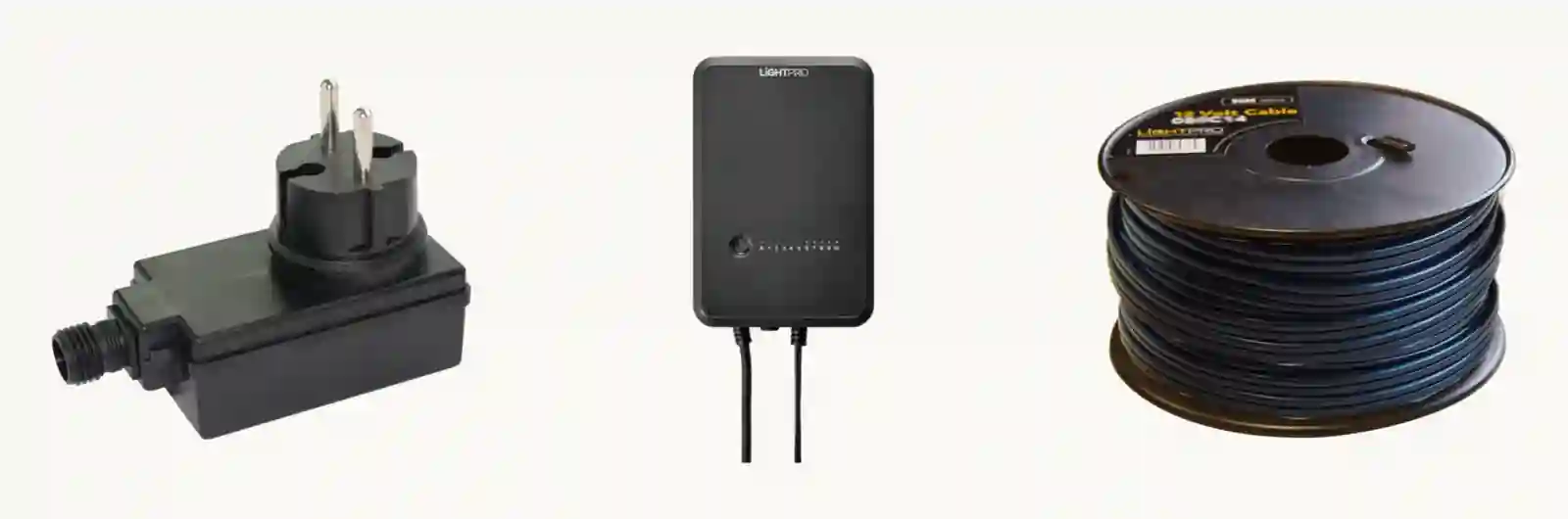 From left to right: the 24 W transformer, the Touch (one housing for 100 W and 150 W) and the 14 AWG main cable. Product photos by Lightpro.
Leave headroom. Lightpro advises always having spare wattage, so you can add lights later without a new transformer. The brand gives no percentage. If your lights come to 95 W, take the Touch 150 W, not the Touch 100 W.
The two Touch models have one button. With it you switch the lights on or off, or you choose mode A: they then come on at dark and go off at daylight, thanks to the dusk sensor. To decide yourself how long they burn, set one of the ten timer modes, from 1 to 10 hours.
The manual says to hang a Touch at least 50 cm above the ground. It is splash-proof (IP44), and for heavy weather Lightpro sells a separate cover, the Transformator Touch Cover. On a short circuit or too high a load, a fuse switches the transformer off. Remove the cause and press the Reset switch.
How long can the Lightpro cable be?
Up to 80 metres from the transformer, when the transformer is fully loaded and the lights are spread evenly along the cable. That is three conditions in one sentence. If most lights hang at the end of a long cable, they are not spread evenly, and the 80 metres no longer holds.
The main cable is one kind: two-core 12 volt cable of 14 AWG. It comes on reels of 25, 50, 100 and 200 metres, with article numbers 025C14 to 200C14.
How many lights fit on a cable does not depend on the cable. The transformer decides that.
The cable does not have to go underground. The system runs at low voltage, and Lightpro says low-voltage cables need not be buried. Lay it along the inside of a border or against the edge of a path, where it is out of the way and where you will find it again. How to choose that edge itself is in choosing garden edging for lawn, gravel and borders.
Connecting lights and branches with Connector F and M
Every Lightpro light comes with a Connector F, a female connector you screw onto the main cable. The cable has no fixed connection points, so the light goes where you want it. Move the connector and small holes stay behind in the cable. Lightpro says that is entirely safe, and that they close up further over time.
The male Connector M sits at the start of a cable. With it you plug the main cable into the transformer. You use the same connector for a branch.
A branch takes three steps. Put a Connector F on the main cable, at the point where the side run should start. Put a Connector M on a piece of extension cable or on a new length of main cable. Plug the M into the F. From the transformer you can make one or more branches this way.
Want several lights in one spot, say three spots around a tree? Then there is the cable splitter (216A). It has three outlets, is waterproof and takes up to 150 W.
Worked example: six Castor 4 spots and two Kuma wall lights
Say a garden of six by twelve metres, with six spots in the borders and two wall lights on the fence. You pick the Castor 4, a dimmable spot that reaches up to 6 metres, and the Kuma, a round wall light that shines downwards.
| Light | Number | Watts each | Together |
|---|---|---|---|
| Castor 4 | 6 | 3.5 W | 21 W |
| Kuma | 2 | 6 W | 12 W |
| Total | 8 | 33 W |
21 W plus 12 W makes 33 W. The 24 W transformer is too small. The Touch 100 W fits, with 67 W left for lights you add later. A Touch 150 W is not needed.
For the cable you take a 25 metre reel. Start at the transformer on the back wall of the house, run along the left border to the back and put the spots on the cable there. At the terrace, make a branch with a Connector F and a Connector M to the fence, for the two wall lights. With 33 W on a 100 W transformer, the cable stays far below the 80 metres Lightpro allows at full load.
To dim the spots later, you do that on the Castor 4 itself, in 6 steps. The Touch transformer switches all the lights on and off together.
Smart switching with Lightpro: Zigbee and the Gateway Smart
You work the Touch transformers with a button, not with an app. The system gets smart through the lights themselves. Lightpro's Zigbee lights are controlled in the Lightpro app: on, off, dimming and choosing a colour.
For that you need the Gateway Smart (219A). It converts Wi-Fi into Zigbee and belongs indoors, in a 230 volt socket with the supplied adapter. Pair the gateway first and only then the lights.
The signal hops from light to light. Lightpro allows at most 20 metres between two products. An average garden can run on one gateway, but the brand advises a gateway of its own for the front garden and the back garden.
If you only have ordinary lights, the Touch transformer with dusk sensor and timer is the simplest choice: it switches everything together, without a phone.
Trying Lightpro lights on your own garden
A lighting plan is easiest to make on a drawing of your own garden. In tuinontwerp.app you load your plot to scale, with the buildings on it, and draw your terrace and borders. Under Lighting, choose the brand Lightpro, and only Lightpro's lights, cable and transformers are ready to place. Lights of different brands do not fit on one cable, so the app keeps them apart by brand.
The app draws a light at the size Lightpro gives. A Kuma goes on a wall or fence; a pond light goes in the water. You draw the 14 AWG cable past your lights, and the overview adds up, per brand, the watts of your lights against the watts of your transformer. If a transformer is too small or a cable too long, the app says so and gives the fix, and under Needed it names the transformer that fits, and how many. With the clock set to the evening, you see how the light falls.
See also the in-lite HUBs and cables, which count in VA, or the transformers of sister brand Garden Lights. Every post about the work in the garden is in the construction category.
Add up your watts, choose 24, 100 or 150 W with room to spare, and stay within 80 metres of cable. Enter your address at the bottom of this page and lay out your Lightpro lights on your own plot.
Frequently asked questions
How many lights can I connect to a Lightpro transformer?
The transformer decides, not the cable. Add up the watts of all your lights and accessories and stay under 24, 100 or 150 W. Six Castor 4 spots at 3.5 W and two Kuma wall lights at 6 W come to 33 W; for that you choose the Touch 100 W.
What is the difference between Connector F and Connector M?
Connector F comes with every light and joins it to the main cable. Connector M goes at the start of a cable, which it then connects to the transformer, or plugs into a Connector F to make a branch.
Does the Lightpro cable have to go underground?
No. Lightpro writes that the system runs at 12 volts, which is low voltage, and that the cables do not need to be buried. Do lay it where nobody trips over it.
How long can a Lightpro cable be?
With the transformer fully loaded, up to 80 metres from the transformer, with the lights spread evenly along the cable. The cable comes on reels of 25, 50, 100 and 200 metres.
Can I control Lightpro lights with an app?
Only Lightpro's Zigbee lights. They work through the Gateway Smart, which sits indoors in a socket and converts Wi-Fi into Zigbee. The Touch transformers themselves have no app; they switch with a dusk sensor and a timer of 1 to 10 hours.
Sources (14)
- Lightpro — Transformator 24W (198A)
- Lightpro — Transformator Touch 100 W (225A)
- Lightpro — Transformator Touch 150 W (226A)
- Lightpro — Handleiding Transformator Touch 100 en 150 W (MI7021)
- Lightpro — Tuinverlichting aanleggen, eenvoudig 12 volt systeem
- Lightpro — Meest gestelde vragen
- Lightpro — Kabel 25 m, 14 AWG (ook 50, 100 en 200 m)
- Lightpro — Connector F (137A)
- Lightpro — Connector M (138A)
- Lightpro — Kabelverdeler (216A)
- Lightpro — Gateway Smart, Wi-Fi naar Zigbee (219A)
- Lightpro — Castor 4 12V (vermogen)
- Lightpro — Kuma 12V (vermogen)
- Techmar — De merken Garden Lights en Lightpro